
Kelebihan :
# Manajemen partisi yang stabil untuk melindungi sistem dan data Anda.
# Mudah digunakan, hanya drag & drop pada peta disk.
# Memperluas partisi sistem untuk memaksimalkan kinerja komputer.
# Partition Manager, kegunaan manajemen harddisk yang lebih baik dan memaksimalkan kinerja komputer.

Any operations with hard drives are critical, and reliability of performance is one of the most important requirements when choosing partitioning software. EASEUS Partition Master is not only reliable itself but also integrated with the Disk & Partition Copy Wizard and Partition Recovery Wizard to ensure 100% data security.
Key features :
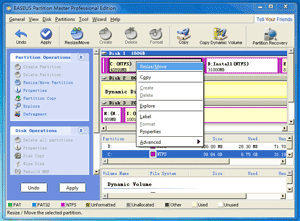
- Extend System Partition to optimize the computers' performance or solve "c drive is out of space" issue. (How to Extend NTFS System Partition without Reboot?)
- Resize/Move Partition without data loss to solve low disk problem and optimize the usage of disk with the drag-and-drop operations easily.
- Create Partition for different usage. For example, one for your data and another for the system or create a new partition for Windows7 dual boot system. (We advise you to create at least two partitions to easily handle the data and system separately.)
- Merge Partitions into a bigger one when one of them runs out of space.
- Split Partition for different usage, one for system and another for data.
- Delete partitions with simple steps.
- Wipe Partition can erase the data on the partition completely and ensure that the data can not be recovered by any data recovery solution.
- Delete all partitions and Format partitions with simple steps.
- Create a Bootable CD/DVD to manage partitions even when the computers fail to boot. (Except for Home edition).
- Support Hardware RAID - useful feature especially for the Windows Server users.
- Convert FAT to NTFS.
- Explore FAT/NTFS partition.
- Label Partitions - assign drive letter to partition for easier recognition.
- View Disk/Partition Property.
- Hide and Unhide Partitions - protect important data from unauthorized or casual access.
- Set an Active Partition - specify one partition to be the boot partition.
Download link :
Originally by : easeus.com


No comments:
Post a Comment